
XR · Standalone optimization · Multiplayer
Curio / CurioXR
Taking detailed desktop anatomy to standalone Quest.
Selective geometry reduction, interaction-aware visibility and system-level networking for an educational XR platform.
- My role
- Senior Unity Developer & Networking ExpertFull-time retainer through OCTAV · team project
- Engagement
- July 2024–August 2025
- Platform
- Meta Quest 2, 3 & 3S
My reported project measurements. These figures have not been independently benchmarked here; performance varies by content and conditions.
01My part in a larger platform
Curio, previously branded CurioXR, is a free educational XR platform for Quest. Multiplayer classrooms, anatomy and other learning experiences form the wider product. I joined through OCTAV as a Senior Unity Developer & Networking Expert on a full-time retainer from July 2024 to August 2025.
The anatomy experience began as a high-end desktop solution built by another developer. My responsibility was to migrate and optimize it for standalone Quest, alongside networking and developer-tooling work within the team. The original anatomy content and the platform as a whole were team efforts.
02Keep the anatomy. Lose the rendering cost.
A detailed anatomical model is useful only if people can inspect it comfortably. The desktop content brought dense, hand-sculpted meshes to hardware with a much smaller rendering budget.
Reduce geometry selectively
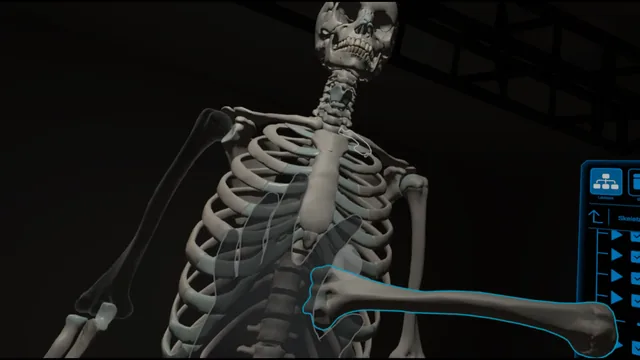
I decimated the hand-sculpted meshes, reducing geometry by approximately 80% while working to retain the anatomical forms and visible detail. The dense nervous system needed a different treatment: simpler meshes supported by detailed textures. That approach was not appropriate for every system, including muscles, so the optimization was selective rather than uniform.
Hide rendering without breaking interaction
I built a custom visibility and occlusion approach to hide obscured meshes while keeping their GameObjects active. This preserved the interaction logic without paying to draw every hidden structure. Simpler materials and GPU instancing helped where the content suited them.
Result on Quest 2: around 20 FPS became 72 FPS, with occasional dips. I also achieved 72 FPS on Quest 3 and Quest 3S. These are my project measurements, not independent benchmarks or a guarantee for every scene.
03Synchronize the intention, then apply it locally.
An anatomical system can contain thousands of objects. Sending the same state change separately for each one creates redundant work and traffic.
I moved suitable operations to system-level network commands. A client receives the instruction for a whole anatomical system and applies the corresponding object changes locally.
- One system commandSelect an operation for an anatomical system.
- Network the instructionAvoid thousands of repeated per-object state updates.
- Apply on each clientLocal logic updates the relevant meshes and interactions.
This work formed part of the team’s multiplayer redesign, addressing synchronization, reconnections and late joiners. I also removed unnecessary client and rendering work from Netcode for GameObjects headless-server execution.
04Test multiplayer without a headset on every desk.
I built a keyboard-and-mouse XR simulation rig for multiplayer testing inside the Unity Editor. For suitable tasks, developers could exercise XR interaction and networking without depending on a headset, Link connection or a device build for every iteration.
The rig reduced that dependency; it did not replace testing on the actual Quest hardware. I have not assigned a numerical productivity gain to it.
05See the experience.
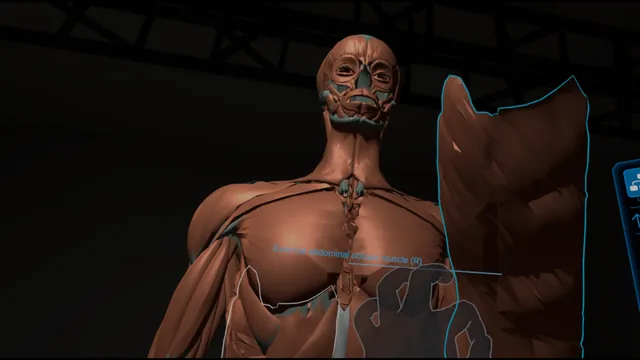
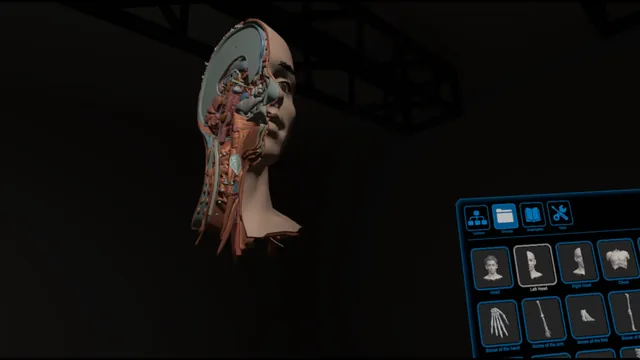
Public OCTAV imagery of Advanced Anatomy illustrates the application and its interactive anatomical systems. It is product media, not a before-and-after benchmark capture of my optimization work.
Loads YouTube only when selected. Playback does not start automatically. Watch on YouTube ↗
06Project context & credits.
My engagement: July 2024–August 2025, full-time retainer through OCTAV. Collaboration: a team project, with the original desktop anatomy solution developed by another developer.
The January–March 2024 module timeline on OCTAV’s public page describes that module’s earlier production, not the dates of my engagement.